Showing posts with label SL4A. Show all posts

Saturday, 31 January 2015

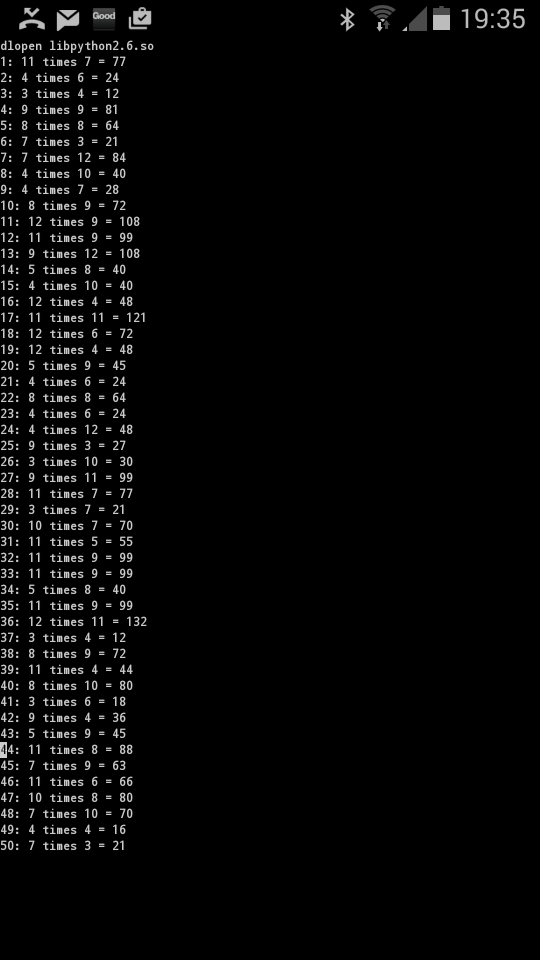
Terrific Times Table Test Tool with SL4A

School test practice for my daughter has again given me inspiration for a Geek project (after my previous project to create a spellings test tool).  At my daughter's school they're currently conducting quick-fire times oral table tests where the teacher reads out 50-odd times table questions in quick succession.  In helping my eldest practice for these tests we found:

  1. It's hard to be really random in the questions you ask and you often end up focusing on one times table (e.g. the twelves).
  2. It's hard to keep track of the questions you ask and the associated answers.
  3. It's hard to make sure you are keeping to an appropriate pace.

So I solved this challenge using SL4A, my favourite scripting language for Android handsets.

Using Python and the Android API binding I could implement the following features:

Feature 1: Generate random times table questions using the randint method from the random module:

from random import randint
FirstVal = randint (3,12)
SecondVal = randint (3,12) 

...the 3 and 12 attributes means the random numbers are always within the range 3 to 12 (inclusive).  This means no super easy 1 and 2 times tables.

Feature 2: Form strings to speak and to print to screen and then say the times table:

#Form strings to print and say
SayString = str (FirstVal) + ' times ' + str (SecondVal)
PrintString = str (i) + ': ' + SayString + ' = ' + str (FirstVal * SecondVal)
print PrintString

#Speak the times table
droid.ttsSpeak(SayString)

Feature 3: Compute a variable delay after speaking ones times table and then speaking the next. Easier calculations get a shorter delay, harder calculations get a longer delay:

  #Compute a different delay depending on the complexity of the times table
  TheAnswer = FirstVal * SecondVal
  if TheAnswer < 60:
    TheDelay = 3
  elif TheAnswer > 90:
    TheDelay = 5
  else:
    TheDelay = 4
  time.sleep (TheDelay)

...it's arguable that the complexity of a times table is not 100% correlated with how large the number is (e.g. 7 * 8 is harder than 10 * 10) but it's a good general rule of thumb.

Feature 4: Having an on-screen record of all the questions.  These can be used for post-test marking of my daughter's answers:


Here's a video of it in action:


...and here's all the code.  The great things for me is that this tool, which makes life just a little bit easier, took a mere 20 minutes to write, test and debug.  SL4A is epic!

import android
from random import randint
import time

#Create a Droid object and speak a welcome message
droid = android.Android()
droid.ttsSpeak('Hi. get ready for a terrific times table test')

#Sleep - gives time for the TTS application to initiate
time.sleep (10)

#Loop for as many times as required
for i in range (1,51):
  #Form the two values for the times table
  FirstVal = randint (3,12)
  SecondVal = randint (3,12)
    
  #Form strings to print and say
  SayString = str (FirstVal) + ' times ' + str (SecondVal)
  PrintString = str (i) + ': ' + SayString + ' = ' + str (FirstVal * SecondVal)
  print PrintString
    
  #Speak the times table
  droid.ttsSpeak(SayString)
    
  #Compute a different delay depending on the complexity of the times table
  TheAnswer = FirstVal * SecondVal
  
  if TheAnswer < 60:
    TheDelay = 3
  elif TheAnswer > 90:
    TheDelay = 5
  else:
    TheDelay = 4
  time.sleep (TheDelay)

Sunday, 18 January 2015

Automated Spellings Test Practice with SL4A

A busy morning a week or so ago gave me an idea for a Geek Dad project.  I was rushing around, getting chores done before work when my daughter reminded me I needed to test her on her spellings ahead of a test that day at school.  If only we had an automatic way of doing this that allowed her to practise on her own....

A detailed Ethnographic* study of how we conduct spelling test practises led to these basic requirements :
  • It's possible to "load" this weeks spellings into the system.
  • The system will read out the spellings to my daughter.
  • The system will take voice commands to manage the practise (e.g. repeat existing word, move on to next word, explain a word).
(*I had a quick think about it!).

First a video of it, then an explanation:


I chose to use SL4A, my favourite scripting language for Android phones, to prototype this.  This allows for a decent Python environment and can access the Android API for text to speech and speech to text capabilities.  One day I'll build a full blown application...

Loading the spellings is done by sending a text message to my phone.  The message format has to be "spellings,<child's name>,word 1,word 2,word n".  I then use the smsGetMessages method to read the SMS inbox, find a spellings test related message and read it into a string array.

The prototype starts by reading a welcome message to the user (gathered from the second part of the SMS) and then reading out  the first spelling.  I use the ttsSpeak method to do the text to speech conversion.  The SpeakSomething function takes an Android object and a string array as parameters.  The reason I use a string array rather than one single string is that it allows you to introduce a short pause whilst the system is speaking.  This makes it sound a little more natural.

The prototype then gets into a While loop, prompting the user to speak and interpreting the speech using the recognizeSpeech method which communicates with Google's most excellent speech to text capability.

The following voice commands have been implemented:
  • The "next" command is achieved by maintaining an index of which word in the string array is the current word.  If "next" is heard, the index is incremented and the new word is played.
  • The "repeat" command just maintains the index and re-plays the current word.
  • The "cheat" command just assigns the current word to the string array (rather than appending it).  This has the effect of putting each letter of the word into an individual element of the string array.  The net result of this is that each letter of the word is spelled out individually.
  • The "define" command makes use of a Dictionary API published by Cambridge University Press.  It's free to sign up for an evaluation key and it offers a lightweight JSON API that takes a word as an argument and provides a response with several definitions, examples and links to online media files.  I simply take the first definition and example from the API response and add them to the string array.The API provides for a bunch of other methods that may be useful for future Geek Dad projects...
  • The "exit" command simply ends the script.

Limitations
  • The recognizeSpeech method is not 100% reliable (not surprising really, what it actually does is pretty epic).  For example it's not great at recognising my 7 year old daughters voice, most likely because it's too "young".  It works better for my 10 year old's voice; I'm guessing because it's more mature.
  • I'd like to be able to pause program execution while the system is speaking.  The API provides a ttsIsSpeaking() method.  However if I test this using while (DroidObject.ttsIsSpeaking() == True): then it doesn't pause at all and if I do while DroidObject.ttsIsSpeaking(): it just pauses forever, even after speech has stopped.  More investigation required....

Full code listing:

#Import statements
import android
import time
import sys
import urllib2
import re

#Constants
DictionaryURLStart ='https://dictionary.cambridge.org/api/v1/dictionaries/british/entries/'
DictionaryURLEnd = '/?format=xml'

#The API Key.  Get this from http://dictionary-api.cambridge.org/
ApiKey = '<Your Key Here>'

#Actually does the speaking
def SpeakSomething(DroidObject,TheMessage):
  for i in range(len(TheMessage)):
    DroidObject.ttsSpeak(TheMessage[i])
    while (DroidObject.ttsIsSpeaking() == True):
      time.sleep(0.1)
      print '.'
    time.sleep(1)

#Used to trim tags from HTML, XML or similar.  Nabbed this from a Stack Overflow page
def TrimTags(InStr):
  try:
    #Uses regular expression module
    cleanr =re.compile('<.*?>')
    cleantext = re.sub(cleanr,'', InStr)
    return cleantext
  except:
    return 'Error trimming tags from a string\r\n'


#################Main Part of the code
print 'starting'
#time.sleep(5)

#Create a Droid object
droid = android.Android()

#Get the messages - True means only un-read messages
result = droid.smsGetMessages(False)

#Used to check if we found a spellings message
MessageFound = False

#Outer loop, look at each message
for i in result.result:
  #Get the message we'll manipulate
  CurrentMessage = (i['body']).encode('utf-8')

  #print CurrentMessage
  #Split in a delimited way  
  MessageStr = CurrentMessage.split(',')

  #See of the first word is "spellings"
  if (MessageStr[0] == "spellings"):
    #See if we have already found a spellings text
    if MessageFound:
      #Do nothing
      print 'message already found'
    else:
      MessageFound = True
      SpellingsMessage = MessageStr
      print SpellingsMessage

print 'end of spellings search loop'

#At this point we should have found a message
if MessageFound:
  #Play a welcome message
  print 'Playing the welcome message'
  MessageToSpeak = []
  MessageToSpeak.append('Hi ' + SpellingsMessage[1])
  MessageToSpeak.append('.  Welcome to your spellings test.')
  print MessageToSpeak
  SpeakSomething(droid,MessageToSpeak)   
  
  #Speak the first spelling
  SpellingNumber = 2  
  MessageToSpeak = []
  MessageToSpeak.append('Word number ' + str(SpellingNumber - 1))
  MessageToSpeak.append(SpellingsMessage[SpellingNumber])
  SpeakSomething(droid,MessageToSpeak)    

  #Now get in a loop  awaiting voice commands
  EndLooping = False  
  while (EndLooping == False):  
    speech = droid.recognizeSpeech('Command',None,None)  
    #See what the user said
    if speech[1] == 'next':
      #Increment thespelling number and speak
      print 'I heard next'
      SpellingNumber = SpellingNumber + 1
      MessageToSpeak = []
      MessageToSpeak.append('Word number ' + str(SpellingNumber - 1))
      MessageToSpeak.append (SpellingsMessage[SpellingNumber])
      SpeakSomething(droid,MessageToSpeak)    
    elif speech [1] == 'cheat':
      MessageToSpeak = []
      MessageToSpeak = SpellingsMessage [SpellingNumber]
      SpeakSomething (droid,MessageToSpeak)
    elif speech[1] == 'define':
      #Get a definition from the Cambridge dictionary API
      DictionaryURL = DictionaryURLStart + SpellingsMessage[SpellingNumber] + DictionaryURLEnd
      print DictionaryURL
      #Do the API request
      request = urllib2.Request(DictionaryURL, headers={"accessKey" : ApiKey})
      APIResponse = urllib2.urlopen(request).read()
      #Start a string array to hold our definition
      MessageToSpeak = []

      #First of all - Get the first definition in the API response
      StartPos = APIResponse.find('<def>')
      EndPos = APIResponse.find('<\/def>',StartPos)
      PartString = APIResponse[StartPos:EndPos]
      PrintString = TrimTags(PartString)
      MessageToSpeak.append('Definition. ' + PrintString)

      #Now get the first example
      StartPos = APIResponse.find('<eg>')
      EndPos = APIResponse.find('<\/eg>',StartPos)
      PartString = APIResponse[StartPos:EndPos]
      PrintString = TrimTags(PartString)
      MessageToSpeak.append('Example. ' + PrintString)
      SpeakSomething (droid,MessageToSpeak)
    elif speech[1] == 'exit':
      print 'I heard exit'
      MessageToSpeak = []
      MessageToSpeak.append('Thank you very much and goodbye!')
      SpeakSomething(droid,MessageToSpeak)    
      EndLooping = True
    elif speech[1] == 'repeat':
      #Dont Increment the spelling number and speak
      print 'I heard repeat'
      MessageToSpeak = []
      MessageToSpeak.append('Word number ' + str(SpellingNumber - 1))
      MessageToSpeak.append(SpellingsMessage [SpellingNumber])
      SpeakSomething (droid,MessageToSpeak)
    else:
      print 'Unknown command'
      MessageToSpeak = []
      MessageToSpeak.append('That was an unknown command!')
      SpeakSomething(droid,MessageToSpeak)


Tuesday, 12 March 2013

Sky IP Speech Control with Android

Just after Christmas I asked my eldest daughter what geekery she wanted me to do next.  She suggested being able to control the TV by speaking to it.  Sounded like a challenge to me....

Overall, a pretty easy problem to solve.  If you've got about £1,500 to spare you can buy a Samsung Smart TV that comes with voice (and gesture control).  That's not pocket money prices and simply buying something that does the whole job is not the Geek Dad way.

A colleague told me about how he can control his Sky box with his iPad over his home WiFi network.  Sounds like an opportunity.   My old Sky box gave up the ghost later last year and was replaced with a shiny new black Sky+ HD box.  This has an ethernet port on the back of it and, by purchasing a Sky Wireless Controller I could use my wife's iPad as a remote control and also use the Sky On Demand service.

A quick Google search for "sky ipad protocol" led me to this blog:
http://www.gladdy.co.uk/blog/2012/08/18/sky-dnla-upnp-the-ipad-app-and-the-ip-control-protocol/

This chap has pretty much done all the hard work to decode the DLNA/ UPnP protocol used by the Sky box and has published a full code listing.  One thing he describes is how the Sky box constantly broadcasts SSDP messages to your LAN so I set up Wireshark to have a look at this. Here's an example:


So this seems to show the Sky box saying, "I am here, I have a file called description37.xml that describes what I can do".  A quick Python script to download description37.xml gets you an XML file that points to several other resources like "player_avt.xml", "player_cm.xml", "player_rc.xml" that seem to describe some SOAP services that the Sky box supports.

Rather than re-inventing the wheel I decided to use the brilliant code that Liam Gladdy published.  The Python script didn't work on my PC Python installation (missing packages) but did work on my Raspberry Pi.   Here's a screenshot of it in action:


So the script listens for the SSDP broadcasts, identifies the IP address for the Sky box and allows you to send SOAP commands to the Sky box.  It works a treat and it's a great way to annoy my wife, (keeper of the Sky remote).

The one thing the script didn't seem to let me do was to change channel on the Sky box, (essential to meet my daughter's challenge).  Another quick Google led me to this forum topic:
http://www.gossamer-threads.com/lists/mythtv/users/525915

These chaps have worked out that the "SetAVTransportURI" operation is used to change the channel on the Sky box and they've published some Python code showing how to do it. So using this, and reverse engineering the code for pause, play and stop from the Liam Gladdy code I was able to write a Python script with functions for pause, play, stop and change channel.

Here's a snippet, a function that sends a pause SOAP command:

# Do a command to pause the playback
#
def PauseSkyBox():
    XML="""<?xml version="1.0" encoding="utf-8"?>
<s:Envelope s:encodingStyle="http://schemas.xmlsoap.org/soap/encoding/" xmlns:s="http://schemas.xmlsoap.org/soap/envelope/">
<s:Body>
<u:Pause xmlns:u="urn:schemas-nds-com:service:SkyPlay:2">
<InstanceID>0</InstanceID>
</u:Pause>
</s:Body>
</s:Envelope>"""

    headers=  { "Content-Length": "%d" % len(XML), "SOAPACTION": "\"urn:schemas-nds-com:service:SkyPlay:2#Pause\"", "Content-Type": "text/xml; char-set=utf-8"  }

    try:
conn = httplib.HTTPConnection("%s:49153" % skyAddress)
conn.request("POST",  "/SkyPlay2", "",  headers)
conn.send(XML)
response = conn.getresponse().read()
        print response
        conn.close()

dom = parseString(response)

    except Exception as inst:
sys.exit("Error doing a Pause command from %s: %s" % (skyAddress, inst))


The function simply creates the XML command as a string, creates a HTTP header, sends the command and awaits a response.

Using SL4A and Android speech recognition (see here for a previous example) it was easy to write a Python script to recognise speech commands and call functions to send a SOAP command to the Sky box. The code implements pause, play, stop, fast-forward (play with a different speed), rewind (play with negative speed) and changing channels.  Observations:
  • The Android speech recognition algorithm doesn't work for me with the word "pause".  It translates to "polls" or "horse".  Must be my geeky accent.   I use the word "still" instead.
  • I'm not 100% happy with the long "elif"  statement for each of the fast forward and rewind translations.  With a bit of thought I could do this better I'm sure.
  • The code relies upon a text file that contains a mapping from a decimal channel number to a hex equivalent and a channel name.  Download your own from one of the postings on the http://www.gossamer-threads.com/lists/mythtv/users/525915 forum.  I found my channel mappings to be different to those in the file so you'll have to play with this a bit.  I put this in the root directory of my SD card on my handset and then used the chdir ('/mnt/sdcard') command.
Here's a full code listing:


# Sky remote controller
# References http://www.gladdy.co.uk/blog/2012/08/18/sky-dnla-upnp-the-ipad-app-and-the-ip-control-protocol/
# http://www.gossamer-threads.com/lists/mythtv/users/525915

#!/usr/bin/python

#Import statements 
import  httplib,  sys, os
from  xml.dom.minidom import parseString
import android
from os import chdir

#Constants
skyAddress = "192.168.0.6"        # IP Address of Sky+HD Box
skyChannelsFile = "sky_channel_guide.txt" # Location of Channel Data

# Parse through tab delmited channel listing and return HEX Channel No
# 
def findSkyChannel(channelFind):
    
    try:
channelsFile = open (skyChannelsFile, "r")
for line in channelsFile:
   rawdata = line.split('\t')
   if rawdata[0] == channelFind:
channelsFile.close()
return (rawdata[3], rawdata[1])
    
channelsFile.close()
return ("0", "Not Found")

    except Exception as inst:
sys.exit("Error in findSkyChannel: %s" % inst)

# Change channel on SkyHD Box via IP given HEX Channel ID
#
def changeSkyChannel(channelId):
    
    XML="""<?xml version="1.0" encoding="utf-8"?>
<s:Envelope s:encodingStyle="http://schemas.xmlsoap.org/soap/encoding/" xmlns:s="http://schemas.xmlsoap.org/soap/envelope/">
<s:Body>
<u:SetAVTransportURI xmlns:u="urn:schemas-nds-com:service:SkyPlay:2">
<InstanceID>0</InstanceID>
<CurrentURI>xsi://%s</CurrentURI>
<CurrentURIMetaData>NOT_IMPLEMENTED</CurrentURIMetaData>
</u:SetAVTransportURI>
</s:Body>
</s:Envelope>""" % channelId

    headers = { "Content-Length": "%d" % len(XML), "SOAPACTION": "\"urn:schemas-nds-com:service:SkyPlay:2#SetAVTransportURI\"", "Content-Type": "text/xml; char-set=utf-8"  }

    try:
conn = httplib.HTTPConnection("%s:49153" % skyAddress)
conn.request("POST",  "/SkyPlay2", "",  headers)
conn.send(XML)
response=conn.getresponse()
data = response.read()
conn.close()

#### Debug Purposes
#os.path.exists(SkyTempFile) and os.remove(SkyTempFile)
#print data
        #os.chdir 'c:\temp'
        #f = open("skytempfile.txt",'w')
#f.write(data)
#f.close()
####
    except Exception as inst:
sys.exit("Error changing channel: %s" % inst)
pass

# Get Current Channel from skyHD Box
#
def getSkyChannel():
    XML="""<?xml version="1.0" encoding="utf-8"?>
<s:Envelope s:encodingStyle="http://schemas.xmlsoap.org/soap/encoding/" xmlns:s="http://schemas.xmlsoap.org/soap/envelope/">
<s:Body>
<u:GetMediaInfo xmlns:u="urn:schemas-nds-com:service:SkyPlay:2">
<InstanceID>0</InstanceID>
</u:GetMediaInfo>
</s:Body>
</s:Envelope>"""

    headers=  { "Content-Length": "%d" % len(XML), "SOAPACTION": "\"urn:schemas-nds-com:service:SkyPlay:2#GetMediaInfo\"", "Content-Type": "text/xml; char-set=utf-8"  }

    try:
conn = httplib.HTTPConnection("%s:49153" % skyAddress)
conn.request("POST",  "/SkyPlay2", "",  headers)
conn.send(XML)
response = conn.getresponse().read()

dom = parseString(response)
return (dom.getElementsByTagName('CurrentURI')[0].firstChild.data.split('//')[1])

    except Exception as inst:
sys.exit("Error getting current channel from %s: %s" % (skyAddress, inst))

# Do a command to pause the playback
#
def PauseSkyBox():
    XML="""<?xml version="1.0" encoding="utf-8"?>
<s:Envelope s:encodingStyle="http://schemas.xmlsoap.org/soap/encoding/" xmlns:s="http://schemas.xmlsoap.org/soap/envelope/">
<s:Body>
<u:Pause xmlns:u="urn:schemas-nds-com:service:SkyPlay:2">
<InstanceID>0</InstanceID>
</u:Pause>
</s:Body>
</s:Envelope>"""

    headers=  { "Content-Length": "%d" % len(XML), "SOAPACTION": "\"urn:schemas-nds-com:service:SkyPlay:2#Pause\"", "Content-Type": "text/xml; char-set=utf-8"  }

    try:
conn = httplib.HTTPConnection("%s:49153" % skyAddress)
conn.request("POST",  "/SkyPlay2", "",  headers)
conn.send(XML)
response = conn.getresponse().read()
        print response
        conn.close()

dom = parseString(response)
#Can't get this dom stuff to work fpr pause.  Don't think it's required though for doing a pause!!!
        #print dom
        #return (dom.getElementsByTagName('CurrentURI')[0].firstChild.data.split('//')[1])

    except Exception as inst:
sys.exit("Error doing a Pause command from %s: %s" % (skyAddress, inst))

# Do a command to stop the playback
#
def StopSkyBox():
    XML="""<?xml version="1.0" encoding="utf-8"?>
<s:Envelope s:encodingStyle="http://schemas.xmlsoap.org/soap/encoding/" xmlns:s="http://schemas.xmlsoap.org/soap/envelope/">
<s:Body>
<u:Stop xmlns:u="urn:schemas-nds-com:service:SkyPlay:2">
<InstanceID>0</InstanceID>
</u:Stop>
</s:Body>
</s:Envelope>"""

    headers=  { "Content-Length": "%d" % len(XML), "SOAPACTION": "\"urn:schemas-nds-com:service:SkyPlay:2#Stop\"", "Content-Type": "text/xml; char-set=utf-8"  }

    try:
conn = httplib.HTTPConnection("%s:49153" % skyAddress)
conn.request("POST",  "/SkyPlay2", "",  headers)
conn.send(XML)
response = conn.getresponse().read()
        print response
        conn.close()

dom = parseString(response)
#Can't get this dom stuff to work fpr pause.  Don't think it's required though for doing a pause!!!
        #print dom
        #return (dom.getElementsByTagName('CurrentURI')[0].firstChild.data.split('//')[1])

    except Exception as inst:
sys.exit("Error doing a Stop command from %s: %s" % (skyAddress, inst))


# Do a command to play, fast forward or rewind
#
def PlaySkyBox(PlaySpeed):
    XML="""<?xml version="1.0" encoding="utf-8"?>
<s:Envelope s:encodingStyle="http://schemas.xmlsoap.org/soap/encoding/" xmlns:s="http://schemas.xmlsoap.org/soap/envelope/">
<s:Body>
<u:Play xmlns:u="urn:schemas-nds-com:service:SkyPlay:2">
<InstanceID>0</InstanceID>
<Speed>%s</Speed>
</u:Play>
</s:Body>
</s:Envelope>""" % PlaySpeed

    headers=  { "Content-Length": "%d" % len(XML), "SOAPACTION": "\"urn:schemas-nds-com:service:SkyPlay:2#Play\"", "Content-Type": "text/xml; char-set=utf-8"  }

    try:
conn = httplib.HTTPConnection("%s:49153" % skyAddress)
conn.request("POST",  "/SkyPlay2", "",  headers)
conn.send(XML)
response = conn.getresponse().read()
        print response
#dom = parseString(response)
#return (dom.getElementsByTagName('CurrentURI')[0].firstChild.data.split('//')[1])

    except Exception as inst:
sys.exit("Error doing a Play command from %s: %s" % (skyAddress, inst))

###The main body of code

#Set up out droid object
droid = android.Android()

#Print some funky stuff
print "###################################################"
print "# SL4A Sky remote                                 #"
print "###################################################"

#Change the directory to where the description file is stored.
chdir ('/mnt/sdcard')


#Boolean to control the loop
KeepLooping = True

while KeepLooping == True:
  
  #Get the speech
  speech = droid.recognizeSpeech("Talk Now",None,None)
  print "You said: " + speech[1]
  
  #Big If statement
  if speech[1] == "still":
    PauseSkyBox()
  elif speech[1] == "play":
    PlaySkyBox("1")
  elif speech[1] == "stop":
    StopSkyBox()
  elif speech[1] == "2":     #Next commands do fast forward
    PlaySkyBox("2")        
  elif speech[1] == "6":
    PlaySkyBox("6")
  elif speech[1] == "12":
    PlaySkyBox("12")
  elif speech[1] == "30":
    PlaySkyBox("30")
  elif speech[1] == "minus 2":   #Next commands do re-wind
    PlaySkyBox("-2")
  elif speech[1] == "minus 6":
    PlaySkyBox("-6")
  elif speech[1] == "minus 12":
    PlaySkyBox("-12")
  elif speech[1] == "minus 30":
    PlaySkyBox("-30")
  #Now test to see if it's a channel number.  So three characters and a number
  elif len(speech[1]) == 3 and speech[1].isdigit:  
    #Get the channel details (in hex) from the description file
    channelId, channelName = findSkyChannel(str(speech[1]))
    #See if we had nothing returned
    if channelId == "0":
print "Unable to find HEX channel No"
    elif channelId == getSkyChannel():
print "Sky+HD is already tuned to %s (%s - %s).  No Need to Change" % (channelName, speech[1], channelId)
    else:   #Actually change the channel
      changeSkyChannel(channelId)
      print "Sky+HD Channel Changed to %s (%s - %s)" % (channelName, speech[1], channelId)
  elif speech[1] == "exit":
    KeepLooping = False
  else:
    print "Command not known!"  

Message from Emily, eldest daughter of the Geek Dad:

hi do you like this boring blog?

Tuesday, 8 January 2013

SL4A and Bing Human Language Conversation

Just before Christmas, my English colleague told me how he likes to conduct instant messaging sessions with my Italian colleague in Italian.  My English colleague doesn't speak Italian, he just uses the babelfish site to do the conversation.

So that's fine for written translation but what about spoken translation?  There are apps available to do this but I thought it would be fun to write my own, (and you learn more by doing rather than simply using).  To do this I used my all time favourite scripting capability for Android, Python using SL4A. 

The plan was to have something that would:
  1. Listen to my voice and translate it to (English) text.  i.e. Speech-to-text
  2. Translate the English in to another language.
  3. Do text-to-speech the resulting language.
For speech-to-text, this is very easy in  SL4A.  Here's a code fragment:

import android

#Set up out droid object
droid = android.Android()


#Get the speech
speech = droid.recognizeSpeech("Talk Now",None,None)
print "You said: " + speech[1]


This just pops up a dialogue that prompts you to speak, when it detects a pause it goes away (presumably to Google's servers) and does the text-to-speech translation.  It then prints the result to screen.  It's pretty accurate and can even handle whole sentences.

Text-to-speech is pretty easy as well.  Assuming you've imported Android and created an Android object (as above), it's simply:

droid.ttsSpeak(TextToSpeak)

So easy! 

To get the text-to-speech part to work I did need to change some settings on my Android device.  Specifically, on my HTC Desire HD I needed to go menu - Settings - Voice input & output settings- Text-to-speech settings and:

1)Install voice data (a quick download from the Play Store), and

2)Set the language - French(France) for my tinkering.

Both of these things used to be a premium product and those chaps from Google give it away for free!

The trickier part was doing the translation from English to French.  However as I've learnt through  my tinkering, there's an API for pretty much everything these days...  A quick Google search led me to the Bing translation API.  This provides a HTTP REST, AJAX and SOAP interfaces to perform a range of tasks.

Using it is relatively simple.  You:

1)Register a developer account, register a translation application and get a client ID and client secret.

2)Make a HTTP GET call to get a temporary access token, (last 10 minutes).

3)Make a HTTP GET call to translate your chosen text.

As luck would have it, this excellent blog details the process you go through to set up and use the API and has Python code available for you to re-use.  All credit to the Blog author, Denis Papathanasiou.

Here's a screenshot.  You can see how it's detected what I've spoken and translated it in to French.  Of course you can't hear the spoken response but trust me, it works a treat.  The nasty error message at the end just comes from the inelegant way I ended the script in order to remove the "Speak Now" dialogue that obscured the text:


Full code listing is below.  To get it to work for you simply edit the clientID and client secret values to match yours.  To change languages simply edit the line TheResponse = translate(token, speech[1], 'fr', 'en') and also change the settings within the handset settings menu.  Inelegant I know but hey, this is tinkering!


# SL4A Demos Transcribe Speech
# http://blog.matthewashrafi.com/
# http://denis.papathanasiou.org/?p=948

#Language translation and suchlike

#Secret keys.  Enter your own here.
MY_CLIENT_ID = ""
MY_CLIENT_SECRET = ""

#!/usr/bin/python

"""

msmt.py


Functions to access the Microsoft Translator API HTTP Interface, using python's urllib/urllib2 libraries


"""


import urllib, urllib2
import json
import android


from datetime import datetime


def datestring (display_format="%a, %d %b %Y %H:%M:%S", datetime_object=None):

    """Convert the datetime.date object (defaults to now, in utc) into a string, in the given display format"""

    if datetime_object is None:

        datetime_object = datetime.utcnow()

    return datetime.strftime(datetime_object, display_format)


def get_access_token (client_id, client_secret):

    """Make an HTTP POST request to the token service, and return the access_token,

    as described in number 3, here: http://msdn.microsoft.com/en-us/library/hh454949.aspx

    """


    data = urllib.urlencode({

            'client_id' : client_id,

            'client_secret' : client_secret,

            'grant_type' : 'client_credentials',

            'scope' : 'http://api.microsofttranslator.com'

            })


    try:


        request = urllib2.Request('https://datamarket.accesscontrol.windows.net/v2/OAuth2-13')

        request.add_data(data) 


        response = urllib2.urlopen(request)

        response_data = json.loads(response.read())


        if response_data.has_key('access_token'):

            return response_data['access_token']


    except urllib2.URLError, e:

        if hasattr(e, 'reason'):

            print datestring(), 'Could not connect to the server:', e.reason

        elif hasattr(e, 'code'):

            print datestring(), 'Server error: ', e.code

    except TypeError:

        print datestring(), 'Bad data from server'


supported_languages = { # as defined here: http://msdn.microsoft.com/en-us/library/hh456380.aspx

    'ar' : ' Arabic',

    'bg' : 'Bulgarian',

    'ca' : 'Catalan',

    'zh-CHS' : 'Chinese (Simplified)',

    'zh-CHT' : 'Chinese (Traditional)',

    'cs' : 'Czech',

    'da' : 'Danish',

    'nl' : 'Dutch',

    'en' : 'English',

    'et' : 'Estonian',

    'fi' : 'Finnish',

    'fr' : 'French',

    'de' : 'German',

    'el' : 'Greek',

    'ht' : 'Haitian Creole',

    'he' : 'Hebrew',

    'hi' : 'Hindi',

    'hu' : 'Hungarian',

    'id' : 'Indonesian',

    'it' : 'Italian',

    'ja' : 'Japanese',

    'ko' : 'Korean',

    'lv' : 'Latvian',

    'lt' : 'Lithuanian',

    'mww' : 'Hmong Daw',

    'no' : 'Norwegian',

    'pl' : 'Polish',

    'pt' : 'Portuguese',

    'ro' : 'Romanian',

    'ru' : 'Russian',

    'sk' : 'Slovak',

    'sl' : 'Slovenian',

    'es' : 'Spanish',

    'sv' : 'Swedish',

    'th' : 'Thai',

    'tr' : 'Turkish',

    'uk' : 'Ukrainian',

    'vi' : 'Vietnamese',

}


def print_supported_languages ():

    """Display the list of supported language codes and the descriptions as a single string

    (used when a call to translate requests an unsupported code)"""


    codes = []

    for k,v in supported_languages.items():

        codes.append('\t'.join([k, '=', v]))

    return '\n'.join(codes)


def to_bytestring (s):

    """Convert the given unicode string to a bytestring, using utf-8 encoding,

    unless it's already a bytestring"""


    if s:

        if isinstance(s, str):

            return s

        else:

            return s.encode('utf-8')


def translate (access_token, text, to_lang, from_lang=None):

    """Use the HTTP Interface to translate text, as described here:

    http://msdn.microsoft.com/en-us/library/ff512387.aspx

    and return an xml string if successful

    """


    if not access_token:

        print 'Sorry, the access token is invalid'

    else:

        if to_lang not in supported_languages.keys():

            print 'Sorry, the API cannot translate to', to_lang

            print 'Please use one of these instead:'

            print print_supported_languages()

        else:

            data = { 'text' : to_bytestring(text), 'to' : to_lang }


            if from_lang:

                if from_lang not in supported_languages.keys():

                    print 'Sorry, the API cannot translate from', from_lang

                    print 'Please use one of these instead:'

                    print print_supported_languages()

                    return

                else:

                    data['from'] = from_lang


            try:


                request = urllib2.Request('http://api.microsofttranslator.com/v2/Http.svc/Translate?'+urllib.urlencode(data))

                request.add_header('Authorization', 'Bearer '+access_token)


                response = urllib2.urlopen(request)

                return response.read()


            except urllib2.URLError, e:

                if hasattr(e, 'reason'):

                    print datestring(), 'Could not connect to the server:', e.reason

                elif hasattr(e, 'code'):

                    print datestring(), 'Server error: ', e.code

#Gets the text from the XML response from MSFT 
def GetTextFromXML (InXML):
  #Here be an example
  #The response was: <string xmlns="http://schemas.microsoft.com/2003/10/Serialization/">grue</string>
  #The '>' and subsequent '<' can be used to denote the string
  
  #Get the position of the first '>'
  BracketPos = InXML.find('>')

  #Now get everything from that point
  MyStr = InXML[BracketPos+1:len(InXML)-1]
  #print "String so far " + MyStr

  #Now get the second '<'
  BracketPos = MyStr.find('<')

  #And get everything before that
  MyStr = MyStr[0:BracketPos]

  return MyStr


###The main body of code


#Set up out droid object
droid = android.Android()

#Get the token to use for the loop
token = get_access_token(MY_CLIENT_ID, MY_CLIENT_SECRET)
#print "Token: " + token

#Print some funky stuff
print "###################################################"
print "# SL4A Demos Transcribe Speech                    #"
print "# From http://blog.matthewashrafi.com/            #"
print "# Also from http://denis.papathanasiou.org/?p=948 #" 
print "###################################################"

while True:
  
  #Get the speech
  speech = droid.recognizeSpeech("Talk Now",None,None)
  print "You said: " + speech[1]
  
  #Call a def to get a response 
  TheResponse = translate(token, speech[1], 'fr', 'en')
  print "The response was: " + TheResponse

  #Now extract from the XML...
  ExtractedResponse = GetTextFromXML(TheResponse)
  print "Extracted Response: " + ExtractedResponse

  #Do the text to speech bit
  droid.ttsSpeak(ExtractedResponse)